|
FOR MICROSOFT 7: C:Program Data/Links 2003. Contains
folders for Course Data, MOPS, News (bit old, I think), and Players (PIN FIles) Additionally, C:Program Files (x86)/Microsoft Games/Links
2003. Gamestat.txt, Score.txt, and MOPTOTAL.txt files can be found here
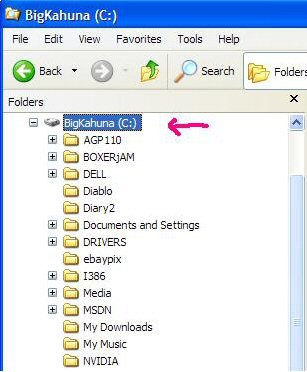
for those tours that require them. Please be patient while the page loads as it has graphics to help explain what to do. The explanation is for WindowsXP, but Win98 and WinME should be somewhat similar. If you are using Windows XP you will find the needed files, .ver, .rec, and .pin are scattered all over your hard drive. Why MS did that is their story and we will not cover it here!!. Another thing they apparently did was make some of those files, hidden files. This means that you must “unhide” them. To accomplish this, just click on your hard drive (or any folder in it).
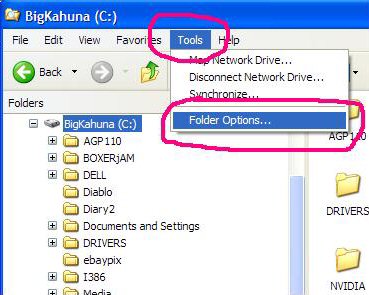
Next, go up to the menu bar and click on “Tools”. On the drop down menu you see, click on “folder options”.
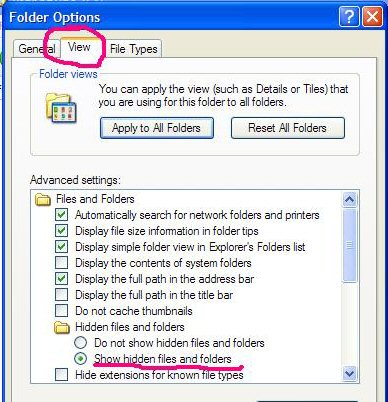
Next, click on the View tab you see. Scroll down till you see “Hidden Files and Folders”. Underneath that there are two options, “ Do not show hidden files and folders” and “Show hidden files and folders”. Make sure there is a dot in the second choice, as shown.
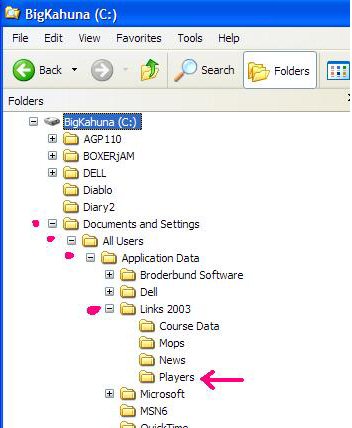
Now we go searching for those elusive files we need. Let’s start with the .pin file, your player file. First open your Windows Explorer. Under your hard drive shown in the left panel, go down and click on the “Documents and Settings” folder. Next, click on the “All Users” folder.Under the All Users folder, click on the “Application Data” folder. Almost there!! Now click on the “Links 2003” folder. Now you will see four folders there. Just click on the “Players” folder and your pin file should be easily found. Just look for the one that starts with CTL (if you’ve properly named your player).
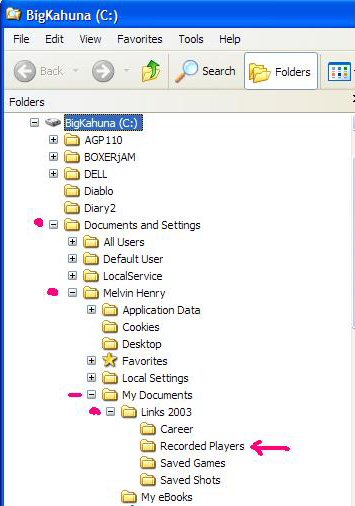
Okay on to the next file. Let’s find that recorded player we saved. Back we go to Windows Explorer again. We also return to the “Documents and Settings” folder. This time under that folder, go to the folder with your name on it (or whatever name you may have used to register your computer, if you did.) It should be under the “Local Service” folder. After you’ve clicked on the folder with your name on it, click on the “My Documents” folder. Under that folder you click on the one named , ta daa, “Links 2003” ! Clicking on the “Recorded Players” folder there will give you access to the .rec file. Make sure you’ve named it so it’s easy to distinguish. Time for the last file, the verify file, .ver. This one may be the easiest one to find because YOU tell
Windows where to put it. Just remember where you save the file. I have mine in
my Links 2003 folder, but it may be easier to place it with your Links Players
since you’ll be zipping together the files and they should all be in the same
folder to do that.
|